
Protect Your WordPress Website
Strengthen your website against malware, brute-force attacks and security vulnerabilities with dedicated WordPress security solutions.
Explore Our Security Features
Malware Scanning
Identify suspicious files and potential threats.
Firewall Protection
Help filter malicious traffic and requests.
Database Hardening
Strengthen essential website security controls.
Security Monitoring
Watch for suspicious activity and potential issues.
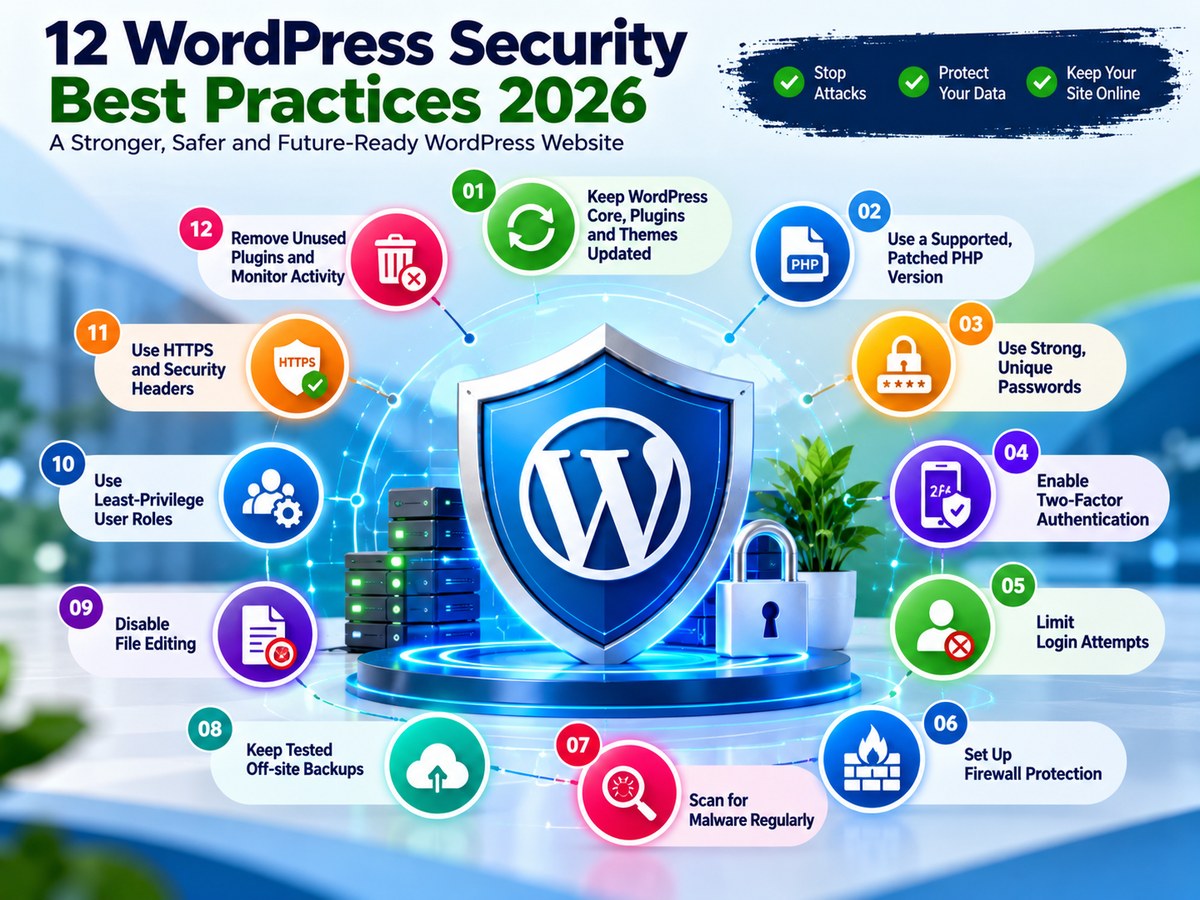
WordPress powers a huge share of the web, which makes it the most targeted website platform in the world. In 2026 the stakes are higher: critical PHP vulnerabilities such as PHP2Shell showed that even a fully updated WordPress site can be exposed. This guide covers WordPress security best practices 2026 in plain language: updates, two-factor authentication, firewalls, malware scanning, backups and the best plugins to enhance WordPress security.
Whether you run a shop near Jayanagar 4th Block, a startup around Silk Board or an agency in BTM Layout, these WordPress security best practices 2026 will help you protect your customers, your rankings and your reputation.
What Are WordPress Security Best Practices 2026?
WordPress security best practices 2026 are the proven habits and settings that keep a WordPress website safe from hackers, malware and data theft. They cover your software (WordPress core, plugins, themes and PHP), your logins, your server protection and your recovery plan.
In simple terms, good WordPress security best practices 2026 mean three things: close known weaknesses by updating, make break-ins harder with strong logins and a firewall, and be ready to recover quickly with tested backups. Follow all three and you remove the easy targets that automated attacks look for.
Why WordPress Security Best Practices 2026 Matter More Than Ever
Attacks on WordPress sites are mostly automated, which is why WordPress security best practices 2026 focus on closing easy openings. Bots scan the internet for outdated plugins, weak passwords and known flaws, and they do not care whether your business is large or small.
A breach can mean stolen customer data, malware, a Google blacklist warning and weeks of lost sales. Our organic SEO team often sees how slowly rankings recover after a hack, which is why prevention is far cheaper than cleanup.
| Risk | What it can cost you |
|---|---|
| Malware injection | Redirects, spam pages, lost customer trust |
| Data theft | Legal and compliance trouble |
| Google blacklist | Traffic and rankings drop sharply |
| Downtime | Lost sales and wasted ad spend |
PHP Vulnerabilities and PHP2Shell: The Big 2026 Lesson
In October 2026, PHP patched two critical flaws, CVE-2026-109618 and CVE-2026-109619, tracked by researchers under the name PHP2Shell. PHP’s advisory rates both 9.2 out of 10, and they can allow remote code execution without logging in. Security firm Bitsight has published a detailed alert.
The lesson for WordPress security best practices 2026 is simple: updating WordPress does not update PHP. The flaw sits below WordPress, so the fix comes from your hosting layer. Check your version at Tools > Site Health > Info > Server and ask your host to upgrade to a patched, supported release.
Want to know if you are affected? SERP Hawk’s website vulnerability analyzer detects CVE-2026-109618 and CVE-2026-109619 and shows what else needs fixing.
12 WordPress Security Best Practices 2026 (Quick Checklist)
| # | Best practice | Difficulty |
|---|---|---|
| 1 | Keep core, plugins and themes updated | Easy |
| 2 | Run a supported, patched PHP version | Medium |
| 3 | Use strong, unique passwords | Easy |
| 4 | Turn on two-factor authentication | Easy |
| 5 | Limit login attempts | Easy |
| 6 | Use a web application firewall | Medium |
| 7 | Scan for malware regularly | Easy |
| 8 | Keep tested off-site backups | Medium |
| 9 | Disable file editing | Easy |
| 10 | Apply least-privilege user roles | Easy |
| 11 | Use HTTPS and security headers | Medium |
| 12 | Remove unused plugins and monitor activity | Easy |
How to Use This WordPress Security Best Practices 2026 Checklist
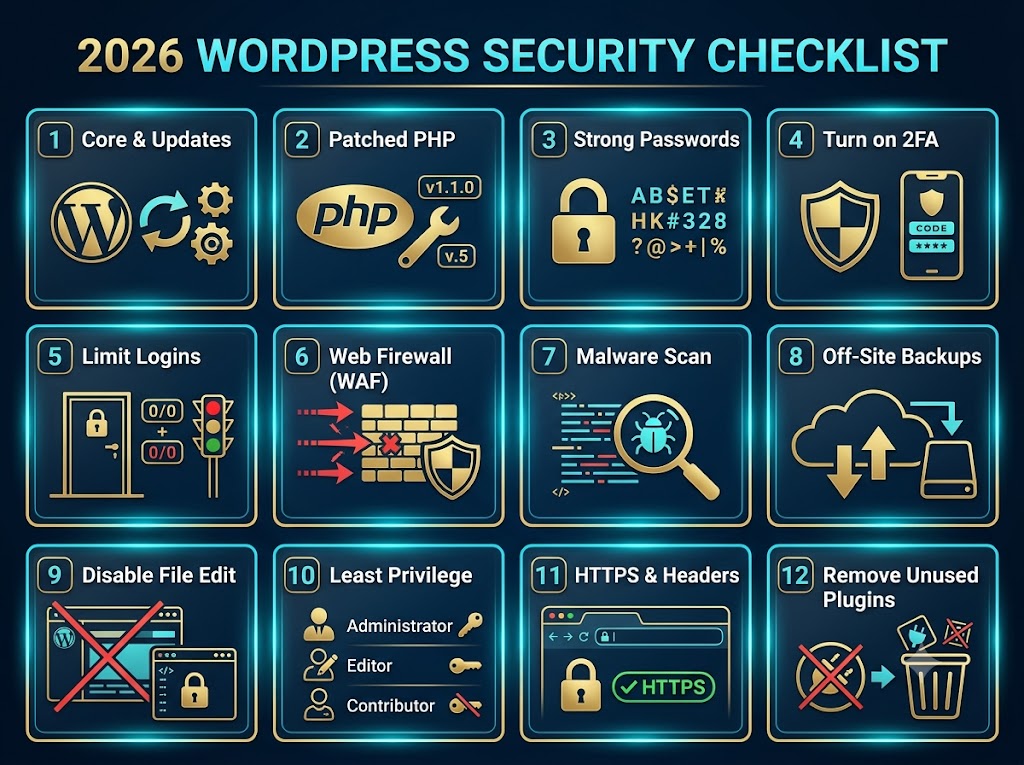
You do not need to do everything in one day. Start with the “Easy” items, which take minutes and block the most common attacks, then move to the “Medium” items with your developer or host.
The order matters too. WordPress security best practices 2026 work in layers: updates close known holes, logins and 2FA protect the front door, a firewall filters bad traffic, and backups save you if something still goes wrong. If one layer fails, the next one catches the problem.
1. WordPress Security Best Practices 2026: Keep Core, Plugins and Themes Updated
Most WordPress vulnerabilities come from plugins and themes, not core. Outdated components are the easiest way in, which is why updating comes first in any list of WordPress security best practices 2026.
As a practical rule, apply critical security updates within a few days of release, and always back up first. Our WordPress website development team handles updates on a schedule so nothing is missed.
2. WordPress Security Best Practices 2026: Update PHP to a Supported, Patched Version
PHP is the engine under WordPress. Versions 8.1 and older no longer receive security fixes, and the 2026 PHP vulnerabilities make an upgrade urgent. Check the PHP supported versions page and move to 8.3 or higher where your plugins allow.
3. WordPress Security Best Practices 2026: Use Strong, Unique Passwords
Reused or simple passwords are still a leading cause of hacked sites. Use a password manager, generate long random passwords for every admin account and never share one login between team members.
4. How to Implement Two-Factor Authentication on a WordPress Site
Two-factor authentication (2FA) is one of the most effective WordPress security best practices 2026. It blocks most stolen-password attacks because a login also needs a second code. Prefer an authenticator app over SMS codes.
Step-by-Step 2FA Setup
- Install a trusted 2FA plugin, such as the official Two-Factor plugin or the login security feature of a security suite.
- Go to your profile in the WordPress dashboard and enable an authenticator app method.
- Scan the QR code with an app such as Google Authenticator or Authy.
- Save your backup codes somewhere safe, offline.
- Require 2FA for all Administrator and Editor accounts.
- Test by logging out and in again before closing your current session.
5. WordPress Security Best Practices 2026: Limit Login Attempts
Brute-force bots try thousands of password guesses. Lock out an IP address after several failed attempts, and consider changing or protecting the default login page.
6. How to Set Up Firewall Protection for WordPress Sites
A web application firewall (WAF) filters malicious traffic before it reaches your site, and it is a core part of WordPress security best practices 2026. There are three common layers, and the strongest setups use more than one.
| Firewall type | How it works | Good for |
|---|---|---|
| Cloud or DNS-level WAF | Traffic passes through the provider first (for example, Cloudflare) | Blocking bad traffic early |
| Plugin firewall | Runs inside WordPress | Easy setup, rule updates |
| Host-level firewall | Provided by your hosting company | Server-wide protection |
Step-by-Step Firewall Setup
- Ask your host which firewall features are already included.
- Add a cloud WAF by pointing your domain’s DNS through the provider.
- Enable bot protection and rate limiting for your login page.
- Install one plugin firewall and switch on automatic rule updates.
- Test your site, checkout and forms to be sure nothing legitimate is blocked.
Remember that a WAF reduces risk but does not replace patching. PHP states that updating is the only complete fix for the PHP2Shell flaws.
7. Top Services for Regular WordPress Malware Scanning
Malware can sit quietly on a site for weeks. Regular scanning finds it early and is a key part of WordPress security best practices 2026. These are the main types of malware scanning services:
| Service type | Examples | Best for |
|---|---|---|
| Security plugin scanners | Wordfence, MalCare | Daily checks inside WordPress |
| Cloud and remote scanners | Sucuri | Outside-in monitoring and cleanup |
| Vulnerability scanners | SERP Hawk website vulnerability analyzer | Version, exposure and CVE checks |
| Managed security services | SERP Hawk WordPress security | Hands-off protection and response |
No single tool catches everything, so combine a malware scanner with an external vulnerability scan. A website security vulnerability scanner checks outdated software, exposed files and headers, while a malware scanner looks for infected files.
8. Keep Off-Site Backups and Test Your Restores
Store backups away from your web server, ideally in cloud storage. Then test a restore at least once a quarter. A backup you have never restored is only a hope, and tested backups are essential to WordPress security best practices 2026.
9. WordPress Security Best Practices 2026: Disable File Editing in the Dashboard
By default, admins can edit theme and plugin files from the WordPress dashboard. If an attacker gets in, that is an easy place to inject code. Add this line to your wp-config.php file:
define('DISALLOW_FILE_EDIT', true);
10. Apply the Principle of Least Privilege
Give each person only the access they need. Writers should be Authors or Editors, not Administrators. Review users every quarter and delete accounts that are no longer used.
11. Use HTTPS and Security Headers
HTTPS encrypts traffic between your visitors and your site. Add security headers such as HSTS and a content security policy to reduce common browser-based attacks. The official Hardening WordPress guide covers more server-level options.
12. Remove Unused Plugins and Monitor Activity
Every installed plugin is extra attack surface, even when deactivated. Delete what you do not use, choose plugins that are actively maintained and keep an activity log so you can spot suspicious changes.
WordPress Security Best Practices 2026 for Different Types of Websites
The core steps are the same for every site, but your priorities change with what your website does.
Small Business and Brochure Websites
For a simple company website, focus on updates, PHP, strong logins with 2FA and off-site backups. These WordPress security best practices 2026 take little time and prevent most automated attacks.
WooCommerce and Online Stores
Stores hold customer details and payment flows, so add a web application firewall, strict user roles and regular malware scanning. If you take card payments, review your obligations under PCI DSS and use trusted payment gateways so card data never touches your server.
Membership, Booking and Portal Sites
Sites with many logins need 2FA for staff, login attempt limits and activity logs. Because these sites store personal data, a regular vulnerability scan is especially valuable.
Agencies and Freelancers Managing Many Sites
Use a central update process, separate admin accounts per client and a standard checklist for every site. Our automation services can schedule updates and backups across many installs.
Best Plugins to Enhance WordPress Security
What are the most effective security plugins for WordPress websites? There is no single winner, because the right choice depends on your site and host. The best plugins support your WordPress security best practices 2026; they do not replace them. This table compares well-known options by purpose.
| Plugin or service | Main strength | Notes |
|---|---|---|
| Wordfence | Firewall, malware scanner, login security | Popular all-in-one option |
| Sucuri | Cloud firewall, monitoring, cleanup | Works outside your server |
| MalCare | Malware scanning and cleanup | Scans run off your server |
| Patchstack | Vulnerability alerts and virtual patching | Focus on plugin and theme flaws |
| Two-Factor | Two-factor authentication | Official, lightweight |
Two tips: use only one all-in-one security plugin, because overlapping tools can conflict and slow your site, and always confirm a plugin is recently updated and well reviewed before installing it. Plugins also cannot fix problems below WordPress, such as old PHP, which is why an outside scan still matters.
WordPress Security in Bangalore: Why Local Context Matters
Bengaluru’s businesses are heavily online. Retailers near the Jayanagar 4th Block Shopping Complex, clinics along Bannerghatta Road, startups around Silk Board and Electronic City, and event brands near Cubbon Park and Lalbagh all rely on WordPress for leads and sales.
Many of these sites sit on shared hosting where PHP versions, backups and firewalls are easy to overlook. A local partner who can review your setup in person or by phone makes WordPress security best practices 2026 easier to act on. We support businesses across Bangalore, Jayanagar, BTM Layout, Madiwala and Silk Board.
Why SERP Hawk Is Considered the Best Website Security Audit Company in Bangalore
Choosing a website security audit company in Bangalore comes down to trust and clarity. If you want WordPress security best practices 2026 applied correctly, here is what you get with SERP Hawk:
- Local team: based in BTM 1st Stage, serving all Bangalore locations
- PHP2Shell detection: our website vulnerability analyzer detects CVE-2026-109618 and CVE-2026-109619
- Dedicated WordPress security: our WordPress security service is built for WordPress owners
- Scan plus human review: automated results are checked by a person, so you get fewer false alarms and a clear priority list
- Security that supports growth: we also work in local SEO, digital marketing consulting and custom software development, so fixes protect your rankings and ad results too
- Honest scope: we explain what a scan can and cannot find. Automated tools complement, and do not replace, a manual penetration test
Learn more about SERP Hawk or browse all our services.
Your WordPress Security Best Practices 2026 Calendar
| How often | Task |
|---|---|
| Daily | Automated malware scan and backups |
| Weekly | Review plugin and theme updates |
| Monthly | Check PHP version, review admin users, run a vulnerability scan |
| Quarterly | Test a backup restore, review plugins, audit user roles |
| Yearly | Full security audit, consider a penetration test |
7 Common Mistakes That Break WordPress Security Best Practices 2026
- Assuming a WordPress update also updates PHP
- Leaving old staging sites online and unpatched
- Using “admin” as a username with a weak password
- Keeping backups only on the same server
- Installing nulled (pirated) themes and plugins
- Running several overlapping security plugins
- Never testing a backup restore
Your 7-Day Plan to Apply WordPress Security Best Practices 2026
Not sure where to begin? Use this simple plan to put WordPress security best practices 2026 into action in a week.
| Day | Task |
|---|---|
| Day 1 | Take a full backup and note your PHP version (Tools > Site Health > Info > Server) |
| Day 2 | Update WordPress core, plugins and themes, and ask your host to patch PHP |
| Day 3 | Turn on two-factor authentication and replace weak passwords |
| Day 4 | Set up a firewall and limit login attempts |
| Day 5 | Run a malware scan and a website vulnerability scan |
| Day 6 | Disable file editing, review user roles and delete unused plugins |
| Day 7 | Test a backup restore and schedule recurring scans |
By the end of the week, your site will follow the most important WordPress security best practices 2026 recommends. If you would rather have experts do it for you, our WordPress security team can handle the setup, and our website vulnerability analyzer will confirm the results.
Why WordPress Security Best Practices 2026 Are Also an SEO Strategy
Security and search rankings are closely linked. A hacked site can show spam pages, redirect visitors or trigger Google security warnings, and all of these hurt your visibility and click-through rate.
Following WordPress security best practices 2026 protects your local SEO work too. Customers searching for services in Bangalore are far less likely to click or trust a site that shows a warning, so a secure site supports both rankings and conversions.
Protect Your Rankings and Ad Spend
A hacked site wastes marketing money. Visitors who click your Google Ads or Meta ads land on a flagged or defaced page. Pair security with social media management and our Google review assistant to build lasting trust, and consider automation services to schedule updates and backups.
Frequently Asked Questions
What are the best WordPress security best practices 2026?
Keep everything updated (including PHP), use strong passwords with two-factor authentication, limit logins, run a firewall, scan for malware, keep tested off-site backups, disable file editing and give users only the access they need.
What are the most effective security plugins for WordPress websites?
Well-known options include Wordfence, Sucuri, MalCare and Patchstack, plus the Two-Factor plugin for 2FA. Choose one all-in-one plugin that suits your host and keep it updated.
How do I set up firewall protection for a WordPress site?
Combine a host-level firewall, a cloud WAF such as Cloudflare and one plugin firewall with automatic rule updates, then test your site to make sure nothing legitimate is blocked.
How do I implement two-factor authentication on a WordPress site?
Install a 2FA plugin, enable an authenticator app in your profile, scan the QR code, save backup codes and require 2FA for all admin and editor accounts.
What are the top services for regular WordPress malware scanning?
Use a plugin scanner for daily checks, a remote scanner for outside-in monitoring and a vulnerability scanner such as SERP Hawk’s analyzer for software and exposure checks.
What are the PHP vulnerabilities everyone is talking about?
CVE-2026-109618 and CVE-2026-109619, nicknamed PHP2Shell, are two critical remote code execution flaws patched on 21 October 2026. Fixed versions include PHP 8.5.12, 8.4.27, 8.3.36 and 8.2.35.
Does updating WordPress fix PHP2Shell?
No. PHP is controlled by your hosting provider, so you need to upgrade PHP through your host or hosting panel.
Where can I get a WordPress security audit in Bangalore?
Contact SERP Hawk Bengaluru using the details below.
Secure Your WordPress Site Today
Don’t wait for a breach. Put WordPress security best practices 2026 in place today. Contact SERP Hawk for a security review, or get dedicated help at wpsecurity.serphawk.com. You can also start from our homepage.
The bottom line: WordPress security best practices 2026 come down to layers: updated software including PHP, strong logins with 2FA, a firewall, regular malware scans, tested backups and an outside vulnerability scan to check it all.
Sources and Further Reading
- Hardening WordPress (WordPress developer documentation)
- PHP supported versions
- OWASP Top 10
- National Vulnerability Database
- PCI Security Standards Council
SERP Hawk Bengaluru
B, 2nd Floor, Bannerghatta Slip Rd, KEB Colony, New Gurappana Palya, 1st Stage, BTM 1st Stage, Bengaluru, Karnataka 560029
Phone: 089213 81769
Website: serphawk.com
Service areas: BTM 1st Stage, BTM 2nd Stage, BTM 3rd Stage, MICO Layout, Maruti Nagar, Tilak Nagar and Bannerghatta