
By the SERP Hawk Bengaluru team | Last updated: 27 October 2026 | Reading time: 12 minutes
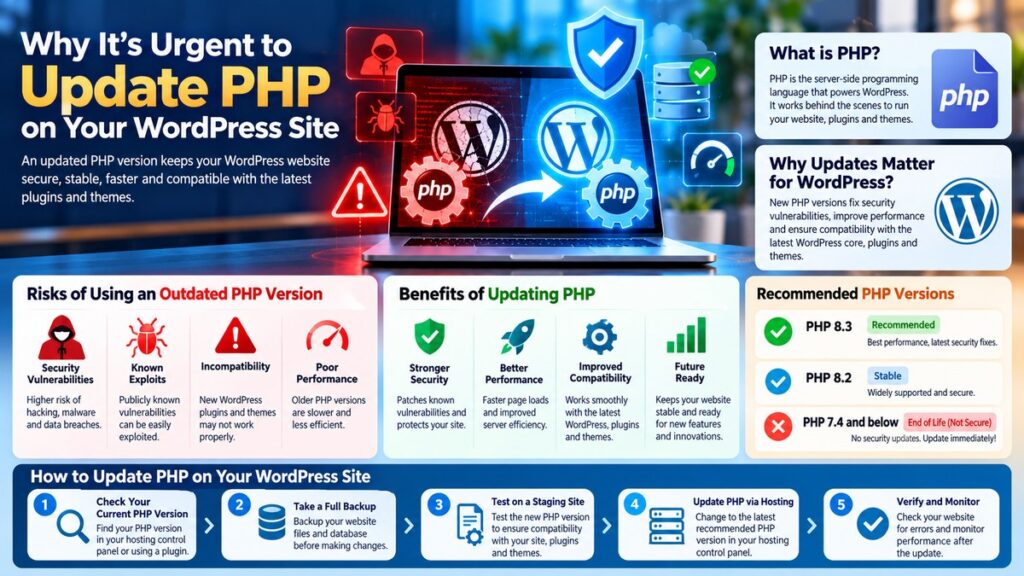
Why it’s urgent to update PHP on your WordPress site comes down to this: of all the updates a WordPress owner faces, one matters more than any plugin or theme right now: PHP. In October 2026, two critical flaws, CVE-2026-109618 and CVE-2026-109619, put a huge number of websites at risk. This guide explains why it is urgent to update PHP on your WordPress site, how to check your version in two minutes and how a website vulnerability scanner can confirm you are safe.
Why It’s Urgent to Update PHP on Your WordPress Site: The Short Answer
PHP released emergency fixes on 21 October 2026 for two vulnerabilities, both rated 9.2 out of 10 in severity. They can let an attacker run code on your server without logging in.
Here is the key point most site owners miss: updating WordPress does not update PHP. The flaws sit in the PHP runtime itself, so no plugin, theme or WordPress core update can block them.
That is the heart of why it’s urgent to update PHP on your WordPress site: the fix is not in your dashboard, it is on your server. Every day your site stays on an unpatched version is another day it is exposed, and a public proof-of-concept exploit now exists.
How the PHP2Shell Crisis Shows Why It’s Urgent to Update PHP on Your WordPress Site
Understanding the timeline explains why agencies reacted so strongly.
| When (2026) | What happened |
|---|---|
| 20 October | PHP posts an advance notice about two critical flaws |
| 21 October | PHP ships fixes in 8.5.12, 8.4.27, 8.3.36 and 8.2.35 |
| Following days | A public proof-of-concept appears, and hosts report exploit attempts |
| Following days | Agencies urge patching; some public sites go offline as a precaution |
Reports indicate that WordPress.org confirmed the flaws are not WordPress-specific and that no WordPress update is planned, because the problem sits below WordPress in the PHP layer. In short, the fix lives with your host.
Do You Need to Update PHP on Your WordPress Site? Common Scenarios
Whether you are exposed depends on where and how your site is hosted. Use this table as a starting point, then confirm with your provider.
| Your setup | Who patches PHP | What you should do |
|---|---|---|
| Shared hosting (cPanel or similar) | Host, or you via the panel | Check the PHP selector, choose a patched version and ask the host for confirmation |
| Managed WordPress hosting | The host | Ask for written confirmation that the fix is applied |
| VPS or cloud server | You or your developer | Update the PHP packages, restart PHP-FPM or Apache and verify |
| Docker or containers | You | Rebuild images on a patched PHP base image and redeploy |
| Staging and old test sites | Often forgotten | Patch them or take them offline |
| Third-party apps on PHP | The vendor | Check vendor advisories and update |
The most common mistake we see is patching the main site and forgetting staging copies, old landing pages or forgotten subdomains. Attackers scan everything on your domain, so you should too.
Update PHP on Your WordPress Site, Not Just WordPress: What Is the Difference?
WordPress is the application. PHP is the engine underneath it. Your hosting provider controls the engine, not the WordPress dashboard.
| WordPress | PHP | |
|---|---|---|
| What it is | Your website software | The language that runs it |
| Updated from | WordPress dashboard | Your hosting panel or host |
| Fixed by this alert? | No | Yes, by upgrading PHP |
| Who controls it | You | Your hosting provider (or you, on a VPS) |
[Infographic: WordPress sitting on top of PHP, on top of the server. Alt text: “WordPress and PHP difference diagram showing why a WordPress update does not fix PHP”]
The WordPress.org requirements page lists the PHP versions WordPress works with, but your host decides what actually runs.
What Are the PHP Vulnerabilities (CVE-2026-109618 and CVE-2026-109619)?
PHP’s advisory confirms two critical flaws fixed in PHP 8.5.12, 8.4.27, 8.3.36 and 8.2.35. Security firm Bitsight tracks them under the name PHP2Shell.
These flaws can allow remote code execution. In plain language, an attacker may be able to take control of a server running a vulnerable PHP version, before WordPress even loads.
How Urgent Is It to Update PHP on Your WordPress Site? The Global Response
This is not a niche concern. Reports indicate that cybersecurity agencies in the US, UK, EU, Canada, Australia and Japan urged organisations to find and patch PHP systems. The FBI and NSA advised taking systems offline if they cannot be updated promptly. Government and public-service websites in Finland, the Netherlands, Belgium and France were reported to have gone offline or become partly unavailable, some as a precaution.
Security researchers also reported that a public proof-of-concept exploit exists, and Sophos covered its release. Singapore’s Cyber Security Agency also published an alert.
PHP is used by a large majority of websites with a known server-side language, and WordPress is one of the biggest reasons why.
The End-of-Life Trap: Why Old PHP Versions Make It Urgent to Update
There is a second problem. Old PHP versions no longer get security fixes at all.
| PHP version | Security fixes? | What to do |
|---|---|---|
| 7.4 and 8.0 | No, long unsupported | Upgrade immediately |
| 8.1 | No, support has ended | Upgrade immediately |
| 8.2 | Yes, for now (support ends 31 December 2026) | Patch to 8.2.35 and plan to move to 8.3 or higher |
| 8.3, 8.4, 8.5 | Yes | Patch to the fixed release |
Check the official PHP supported versions page for current dates. If your site runs PHP 8.1 or older, no patch for these flaws exists for your version. The only fix is a full upgrade.
How to Check Your PHP Version in WordPress (2 Minutes)
- Log in to your WordPress dashboard.
- Go to Tools > Site Health.
- Click the Info tab.
- Open the Server section and read the PHP version.
Compare the number to the table above. If you cannot log in or are unsure, ask your host.
How to Update PHP on Your WordPress Site
Once you understand why it’s urgent to update PHP on your WordPress site, the process itself is straightforward. Follow these five steps in order.
Step 1: Back Up Your Site
Take a full backup of files and database first. Many hosts offer one-click backups.
Step 2: Test on a Staging Copy
A new PHP version can break old plugins or themes. Test on a staging site if you can.
Step 3: Change the PHP Version in Your Hosting Panel
Most hosts let you select the PHP version in cPanel, Plesk or their own dashboard. Choose a supported, patched version such as 8.3 or 8.4.
Step 4: Restart and Re-Test
Confirm the new version in Site Health, then browse your site, checkout and forms.
Step 5: Scan and Verify
Run a website security vulnerability scanner to confirm nothing else is exposed. This is where SERP Hawk’s website vulnerability analyzer helps.
Common Problems After Updating PHP (and How to Fix Them)
A PHP upgrade is usually smooth, but older sites can hit snags. Here is what to expect.
White Screen or Critical Error
This usually means a plugin or theme is not compatible with the new PHP version. Enable WordPress recovery mode, or rename the plugin folder over FTP to deactivate it, then look for an updated version.
Deprecation Warnings
Old code may display warnings after the upgrade. They are not always fatal, but they signal software that needs updating. Ask the plugin author for a compatible release.
Abandoned Plugins
If a plugin has not been updated in years, it may be both incompatible and insecure. Replace it with a maintained alternative. Our WordPress website development team can migrate functionality safely.
Slow Site After the Change
Clear your caching plugin and server cache. A newer PHP version is normally equal or faster once caches rebuild.
If You Must Roll Back
Rolling back to an unpatched version should only be a short-term measure while you fix a conflict. Keep the site protected with extra controls and move forward as soon as possible.
PHP Update Checklist for WordPress Owners
| Task | Done? |
|---|---|
| Full backup of files and database | ☐ |
| Note current PHP version (Tools > Site Health > Info > Server) | ☐ |
| Update WordPress core, plugins and themes first | ☐ |
| Test on staging if available | ☐ |
| Switch to a supported, patched PHP version | ☐ |
| Re-test forms, checkout, login and search | ☐ |
| Remove unused plugins and themes | ☐ |
| Run a website vulnerability scanner and fix findings | ☐ |
| Schedule recurring scans | ☐ |
6 Questions to Ask Your Hosting Provider About PHP (
Since your host controls PHP, a short email can save you days of uncertainty. When you are working out why it’s urgent to update PHP on your WordPress site, ask your provider:
- Which PHP version is my site running right now?
- Has the October 2026 security fix been applied to my server or plan?
- If not, when will it be, and can I switch versions myself in the panel?
- Are my staging sites and subdomains covered too?
- Do you offer a web application firewall as a temporary safeguard?
- Can you confirm the update in writing?
Keep the reply. If your host cannot answer clearly, that itself is a signal to consider a provider that treats security updates as a priority.
What If You Cannot Update PHP on Your WordPress Site Today?
Sometimes you cannot update PHP on your WordPress site immediately, for example on shared hosting that has not rolled out the fix. In that case:
- Contact your host and ask for the patched PHP version and a date
- Consider a web application firewall (WAF) to reduce exposure
- If your host and security advisers recommend it, take the site offline until it is patched
Some hosts have disabled the PHP session.upload_progress feature as a stopgap. Treat this as temporary. PHP’s position is that updating is the only complete fix.
What Happens If You Don’t Update PHP on Your WordPress Site?
Delaying is risky, and this is why it’s urgent to update PHP on your WordPress site. The risks are concrete:
- Site takeover: attackers can deface pages, inject malware or steal customer data
- SEO damage: Google can flag or blacklist a compromised site, wiping out search visibility. Our organic SEO team sees how long recovery can take
- Wasted ad spend: visitors from Google Ads or Meta ads land on a broken or flagged page
- Reputation loss: customers lose trust quickly after a breach
- Compliance risk: unsupported software can breach PCI DSS and data protection obligations
Why It’s Urgent to Update PHP on Your WordPress Site for Bangalore Businesses
Bengaluru runs on websites. Retailers around the Jayanagar 4th Block Shopping Complex, startups near Silk Board and Electronic City, clinics along Bannerghatta Road and event businesses near Cubbon Park and Lalbagh all rely on WordPress. Many sit on shared hosting where the PHP version is easy to overlook, which is exactly why it’s urgent to update PHP on your WordPress site this week.
We help businesses across Bangalore, including BTM Layout, Jayanagar, Madiwala and Silk Board.
How a Website Vulnerability Scanner Helps After the PHP Update
A website vulnerability scanner tests your site from the outside, the way an attacker would. After you update PHP on your WordPress site, it confirms the fix worked and checks for outdated software, exposed files, missing security headers and weak configuration.
A website vulnerability scanner online is the quickest option because you enter your URL and get a report without installing anything. You may also find a website vulnerability scanner online free or website vulnerability scanner free online option, which is useful for a first look. Free scans are often shallow, so pair them with a professional review for any site that handles customer data.
SERP Hawk’s website vulnerability analyzer detects CVE-2026-109618 and CVE-2026-109619, checks for other security risks and gives you a prioritised action list your developer can follow. Our team reviews results by hand to reduce false alarms.
| Check | Why it matters |
|---|---|
| PHP version | Shows if you are on a fixed, supported release |
| Outdated plugins and themes | Common entry point for attackers |
| Exposed files (.env, .git) | Can leak passwords and keys |
| Security headers | Reduces common browser-based attacks |
| Re-scan after fixes | Confirms the problem is closed |
Website Vulnerability Scanner vs WordPress Security Plugin
Many owners assume a security plugin is enough. It helps, but it works inside WordPress, which is exactly where this PHP flaw does not reach. An external scan sees your site the way an attacker does.
| Security plugin | Website vulnerability scanner | |
|---|---|---|
| Runs | Inside WordPress | From outside, like an attacker |
| Sees PHP version issues | Limited | Yes, via version and exposure checks |
| Finds exposed files | Sometimes | Yes |
| Works if WordPress is broken | No | Yes |
| Best use | Daily protection | Independent verification |
Use both. A plugin guards the door daily; a scanner checks that the building itself is secure.
Beyond PHP: 10-Point WordPress Hardening Checklist
Knowing why it’s urgent to update PHP on your WordPress site is step one, but strong security is layered.
- Keep WordPress core, plugins and themes updated
- Delete plugins and themes you do not use
- Use strong, unique passwords and a password manager
- Turn on two-factor authentication for admins
- Limit login attempts and hide the default login URL if appropriate
- Keep automated, tested off-site backups
- Use HTTPS everywhere with proper security headers
- Disable file editing in the WordPress dashboard
- Use a web application firewall for added protection
- Run a website vulnerability scanner on a schedule, such as monthly
If you would rather hand this to specialists, our WordPress security service covers it end to end.
5 Myths About Updating PHP
Myth 1: “My WordPress is up to date, so I’m safe.” WordPress and PHP are updated separately. A current WordPress on old PHP is still exposed, which is why it’s urgent to update PHP on your WordPress site separately.
Myth 2: “Hackers only target big sites.” Attacks are automated and scan millions of sites. Small business sites are easy targets.
Myth 3: “My host will handle it automatically.” Some do, many do not. Always get written confirmation.
Myth 4: “A firewall means I can skip the update.” A WAF may reduce exposure, but PHP states that updating is the only complete fix.
Myth 5: “A free scan tells me everything.” A free scan is a good first look, but it can miss deeper issues, especially behind login pages.
How to Explain the PHP Risk to a Client or Your Boss
If you are an agency, freelancer or in-house developer, you may need to justify urgent work to someone non-technical. Keep it simple and business-focused.
Start with the analogy: WordPress is the shop, PHP is the building it sits in. A new lock on the shop door does not help if the building itself has a known weakness. Then explain the stakes in terms they care about: a compromised site can lose customers, rankings and ad spend, and may breach compliance duties.
Finish with a clear, small ask: approve a short maintenance window, a backup and a PHP version change, followed by a scan to confirm everything is secure. Framing why it’s urgent to update PHP on your WordPress site as a low-cost, low-effort fix against a high-cost risk usually gets quick approval.
Compliance and Trust: The Business Case
Failing to update PHP on your WordPress site means running unsupported software, which can create compliance problems under standards such as PCI DSS, and under data protection laws if customer data is exposed. India’s CERT-In publishes guidance on cyber incidents that businesses should be aware of. Confirm what applies to you with your compliance adviser.
Beyond compliance, trust is the real asset. A clean, fast, secure website supports your local SEO rankings and your Google reviews, which our Google review assistant helps you grow.
Why SERP Hawk Is Considered the Best Website Security Audit Company in Bangalore
Choosing a website security audit company in Bangalore comes down to trust. If you need help to update PHP on your WordPress site safely, here is what you get with SERP Hawk:
- Local team: Based in BTM 1st Stage, serving all Bangalore locations
- Scan plus human review: automated results checked by a person
- Plain-language reports: clear severity ratings and practical fixes
- Security with growth: experience across WordPress development, local SEO and digital marketing consulting
- Honest scope: we explain what a scan can and cannot find. Automated tools complement, but do not replace, a manual penetration test
Learn more about SERP Hawk or see all our services.
Need Help Securing WordPress Right Now?
If you want experts to handle the work, SERP Hawk’s dedicated WordPress security service is ready. Secure your WordPress site at wpsecurity.serphawk.com before attackers find the gap.
You can also contact our team for urgent PHP update help, or explore custom software development and automation services if your platform needs deeper hardening.
Frequently Asked Questions
Why is it urgent to update PHP on your WordPress site?
Because two critical PHP flaws can allow remote code execution, and no WordPress update can block them. Only upgrading PHP closes the gap.
Does updating WordPress also update PHP?
No. PHP is controlled by your hosting provider or server, not the WordPress dashboard.
What PHP version should my WordPress site use?
Use a supported, patched version, ideally PHP 8.3 or higher. PHP 8.1 and older no longer receive security fixes.
How do I check my PHP version in WordPress?
Go to Tools > Site Health > Info > Server in your dashboard.
Can a website vulnerability scanner tell me if I am affected?
Yes. A good website security vulnerability scanner checks versions and exposure. SERP Hawk’s analyzer detects these specific CVEs.
Is there a website vulnerability scanner online free?
Yes, some tools offer free scans. They are useful for a first check but are often limited in depth.
Where can I get a website security audit in Bangalore?
Contact SERP Hawk Bengaluru using the details below.
How long does it take to update PHP on WordPress?
The switch itself takes minutes in most hosting panels. Allow extra time for backups and testing, especially if you rely on older plugins.
Will updating PHP break my WordPress site?
It can if a plugin or theme is outdated. Back up first, test on staging and update your plugins before changing the PHP version.
Do I need a website security vulnerability scanner if my host updated PHP?
Yes. Patching PHP fixes one problem. A website security vulnerability scanner checks for others, such as outdated plugins, exposed files and weak headers.
Is a website vulnerability scanner free online enough for a business site?
It is a good first check. For stores, bookings or any site holding customer data, add a professional scan and review.
Which website vulnerability scanner online is best for WordPress?
Choose one that checks software versions, exposed files and headers, and explains how to fix each finding. SERP Hawk’s website vulnerability analyzer does this and also detects CVE-2026-109618 and CVE-2026-109619.
What happens if I don’t update PHP on my WordPress site?
Your site stays exposed to the critical flaws, and to every future PHP vulnerability if you are on an unsupported version. That can lead to takeover, malware, lost search rankings and customer data theft, which is why it’s urgent to update PHP on your WordPress site now.
How Often Should You Update PHP on Your WordPress Site?
This alert will not be the last. PHP versions move through a predictable cycle: active support, then security-only support, then end of life. Knowing where your version sits means you are never caught off guard.
A practical routine is to check your PHP version every month in Tools > Site Health, review the PHP supported versions page each quarter, and plan a move to the newest stable branch before your current one reaches its end of life. Add a recurring website vulnerability scanner check so outdated components are caught early. Treating PHP updates as routine maintenance, not an emergency, is the best way to stay ahead of the next critical flaw.
Update PHP on Your WordPress Site Today: Get It Checked in Bangalore
Don’t wait for an attack to find out you are exposed. Contact SERP Hawk today, or start from our homepage. You can also build trust after you are secure with our Google review assistant and social media management.
The bottom line: why it’s urgent to update PHP on your WordPress site comes down to one fact. The flaw sits below WordPress, so only a PHP upgrade closes it. Check your version today, update through your host, then use a website vulnerability scanner to confirm your site is safe.
SERP Hawk Bengaluru
B, 2nd Floor, Bannerghatta Slip Rd, KEB Colony, New Gurappana Palya, 1st Stage, BTM 1st Stage, Bengaluru, Karnataka 560029
Phone: 089213 81769
Website: serphawk.com
Service areas: BTM 1st Stage, BTM 2nd Stage, BTM 3rd Stage, MICO Layout, Maruti Nagar, Tilak Nagar and Bannerghatta